AIエージェント組み込みアプリの利用方法と効果:ValuScopeで投資業務を回す実践ガイド
バージョン注記: 2026年7月12日時点の
valuscope-next
の画面仕様、マニュアル、コードを参照しています。ValuScopeの本番利用による工数削減率や投資成果の統計は公開されていないため、本記事では実装から確認できる効果と、導入後に測るべきKPIを明確に分けます。
第1回で設計思想、第2回で実装方法を整理しました。最終回は利用方法です。私が投資チームのDD品質を標準化した経験では、良いツールを入れるだけでは成果は出ず、誰が、どの順番で、何を合格とするかまで決めて初めて運用になります。
この回の結論を、利用と効果に分けて置きます。
| 観点 | 実践ポイント |
|---|
| 始め方 | DealとFund Profileを先に整え、公開情報からWeb Researchを実行する |
| 資料利用 | 権限を確認した資料だけ保存し、Deck Analysis以降へ渡す |
| 人の判断 | 受信箱で成果物、次ステージ、次エージェントを確認して承認する |
| 改善 | 却下理由を残し、再実行時の入力やプロンプト改善へ使う |
| 確認できる効果 | 作業の標準化、状態可視化、成果物の系譜、判断点の明確化 |
| まだ測るべき効果 | 工数削減、承認率、再実行率、品質、ステージ滞留、費用対効果 |
AIの価値を「生成文字数」ではなく、意思決定に必要な情報がどれだけ早く、抜けなく、説明可能な形で揃ったかで測るのがポイントです。
いきなりエージェントを実行すると、一般論の多い出力になりがちです。ValuScopeでは、Deal、Fund Profile、Documentの三つが文脈の土台になります。
| 土台 | 最低限入れる情報 | 出力への影響 |
|---|
| Deal | 企業名、Webサイト、業界、ステージ、概要 | Web調査と案件識別の精度 |
| Fund Profile | ファンド規模、投資領域、ステージ、地域、チケット | ファンド適合性と論点の優先順位 |
| Document | ピッチ資料、財務、面談メモ、参考資料 | 企業固有の仮説、数値、不足情報 |
特にFund Profileは見落とされやすい項目です。同じスタートアップでも、シード中心の10億円ファンドと、レイター中心の500億円ファンドでは、魅力と懸念の重みが変わります。6月4日の開発履歴でファンド情報の入力とAI参照が追加されたのは、AIを一般的な企業分析から自分たちの投資判断支援へ近づける変更でした。
資料は多ければよいわけではありません。古いピッチ、新しい財務、未整理の面談メモを無差別に入れると、時点の違う数字が衝突します。ファイル名、資料種別、作成日、共有権限を整え、「どれが一次情報か」を人が判別できる状態にします。
最初のエージェントはWeb Researchが自然です。企業名、Webサイト、業界、ステージなど公開可能な情報だけを使い、企業公式情報、ニュース、第三者情報を調べます。
実行前に確認するのは次の四点です。
- ステルス案件ではないか。
- 企業名や概要をWeb検索とOpenAI APIへ送ってよいか。
- 非公開売上、評価額、個人情報を入力欄へ混ぜていないか。
- 調査対象の企業Webサイトが正しいか。
ValuScopeのUIは、Web検索を伴う実行で専用の確認モーダルを出します。面倒でも、クリックの意味を「AIを動かす」ではなく「この情報を外部へ送る」と理解してもらうために必要です。
出力を読むときは、要約の流暢さより次を見ます。
- 出典URLと日付があるか。
- 会社の自称と第三者の確認が区別されているか。
- 市場規模の定義・地域・時点が揃っているか。
- 見つからなかった情報が「不明」として残っているか。
- 次に資料で検証すべき主張が明示されているか。
ここで使えるのは「合格/不合格」より、次の検証課題を作れたかという基準です。Web調査だけで投資判断を完成させようとすると、公開情報の多い企業ほど有利になるバイアスが入ります。
Web Researchの後、ピッチ資料があればDeck Analysisへ進みます。資料がなければMeeting Agendaへ進む設計になっており、「資料待ちで全工程が止まる」ことを避けています。
Deck Analysisでは、次の観点を確認します。
| 観点 | 良い出力 | 要修正の兆候 |
|---|
| 数値 | 単位、期間、通貨、出典ページが揃う | 売上とARR、月次と年次が混ざる |
| 事実と推定 | 推定に前提と確度がある | 資料にない市場シェアを断定する |
| 投資仮説 | 成立条件とキル基準が対になる | 強みだけを並べる |
| モート | 7 Powers等で持続条件を説明 | 「独自技術」「先行者」で止まる |
| 不足情報 | 誰がいつ何を確認するか | 「追加確認が必要」で終わる |
私は、装置問題とされていた収率不良をシミュレーションで追ったとき、仮説を一つに決め打ちせず、何が観測されれば仮説が崩れるかを先に置きました。AI分析にも同じ姿勢が必要です。もっともらしい物語ではなく、反証可能な問いへ変換できているかを見ます。
ValuScopeではDeck Analysisの成果物をDOCXとしてDocumentへ保存できます。そのため、次のMeeting AgendaやQuestion Listが前段の成果物を参照できます。ただしAI生成文書を元資料と同列に扱うと自己参照が起きるため、入力資料判定では
AI-
接頭辞の生成資料を除外する実装があります。これは地味ですが重要なガードです。
エージェントが完了すると、アクション受信箱へ
AWAITING_REVIEW
のカードが出ます。カードには対象ディール、エージェント、モデル、要約、提案ステージ、次に起動するエージェントが表示されます。
承認前のチェックは、三層に分けると運用しやすくなります。
| 層 | 確認すること | 判断例 |
|---|
| Evidence | 根拠、出典、数値、資料との一致 | 事実誤認があれば却下 |
| Analysis | 仮説、反証、リスク、不足情報 | 論点不足なら理由付き再実行 |
| Action | 次ステージと次エージェント | まだ進めないなら承認しない |
「文章がよく書けている」と「ステージを進めてよい」は別の判断です。ValuScopeは両者を一枚のカードで見せますが、レビュー手順では分けて考えるべきです。
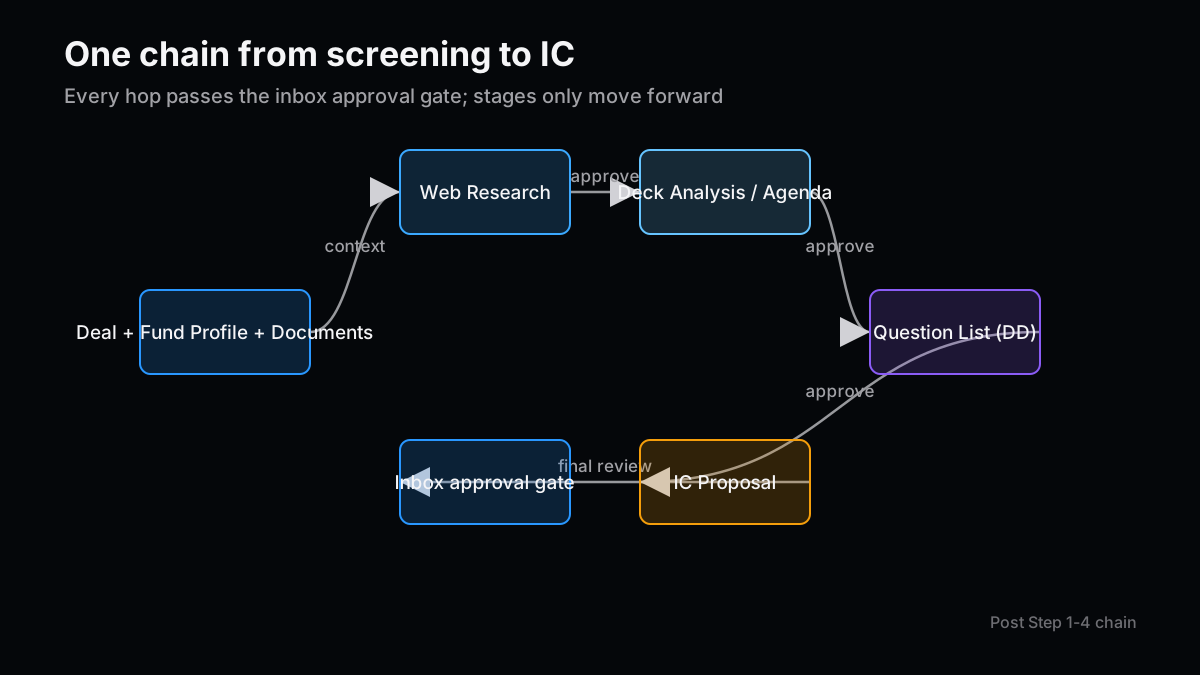
承認すると、ステージは前方だけへ進み、次工程が起動します。Web Researchなら
SCREENING
へ、Deck AnalysisまたはMeeting Agendaなら
DD
へ、Question Listなら
IC
へ進む提案です。IC Proposalの後に
CLOSED
へ自動遷移しない点も大切です。最終的な投資実行・見送りはVCが手動で決めます。
却下時は、理由を短くても具体的に残します。「質が低い」では改善できません。「競合3社のうち2社が非上場でTrading Compsにならない」「ARRと売上を混同」「2024年資料を最新値として使用」のように、再実行で直せる形にします。
エージェントを個別ツールとして使うより、成果物の連鎖として使う方が効果を測りやすくなります。
面談の目的を「情報収集」ではなく「前進/見送りを判別すること」に置きます。質問数を増やすより、答えによって投資仮説がどう変わるかを明示します。優先質問とkiller questionがあれば、限られた面談時間を守れます。
DD質問は20〜30問を目安に、質問、確認意図、望ましい証拠、判別基準を揃えます。質問表を作っただけでは効果になりません。担当者、期限、回答、証拠リンク、未解決フラグを運用へ足すと、DDの進捗管理に変わります。
IC付議骨子では、TAM/SAM/SOM、base/bull/bear、MOIC、pre-mortem、不足情報を確認します。AIが整った文章を書くほど、未確認の前提が見えにくくなることがあります。そこで、結論より先に「この判断が成立するために真でなければならないこと」をレビューします。
この連鎖の狙いは、AIが判断を代替することではなく、各会議の入口で情報を整え、出口で次の検証項目を残すことです。
ValuScopeのチャットには、ポートフォリオやディールを参照して答える経路と、変更提案を作る経路があります。利用者が「最新のRunwayが短い企業を列挙して」と聞くのは参照です。「A社をDDへ変更して」は更新提案です。
更新提案では、現在値と新値を比較し、必要な項目だけ選んで適用します。適用までにDB値が変わった項目は競合としてスキップされます。チーム運用では、競合はエラーではなく「人の更新がAI提案より新しい」ことを示す安全な結果です。
良い使い分けは次の通りです。
- 集計、検索、要約、比較はチャットで広く依頼する。
- DB変更は提案として受け取り、差分を確認する。
- 複数件の一括変更は、件数と対象を先に確認する。
- 財務値やステージは、根拠となる資料・会議と一緒に履歴へ残す。
チャットを入口にしても、最終的なデータ品質はフォーム、型、履歴、承認へ戻す。この往復が業務アプリらしさだと思います。
公開された運用統計がなくても、コードと仕様から確認できる効果はあります。ここでは「可能性」ではなく、機能として存在する変化に限定します。
| 効果 | 実装上の根拠 | 意味 |
|---|
| 作業標準化 | 6エージェントの共通persona・Skill・出力形式 | 案件ごとの観点ばらつきを抑える |
| 状態可視化 | RunとActionItem、受信箱のグルーピング | 実行中、要確認、失敗、処理済みを区別 |
| 判断点の明確化 | 承認・却下・再実行とdecisionNote | AI出力と人の判断を分離 |
| 成果物の再利用 | Document、DOCX/XLSX、sourceDocIds | 次工程と会議で参照できる |
| 前方遷移の安全性 | isForwardStage | 承認連鎖による意図しない後退を防ぐ |
| 同時更新の安全性 | currentValue 競合検知 | 古いAI提案による上書きを避ける |
この中で私が最も大きいと感じるのは、作業時間より「どこで止まっているか」が見えることです。DDは分析そのものより、資料待ち、担当不明、レビュー待ちで滞留します。受信箱はAIの出力箱ではなく、判断待ちを可視化するキューとして価値があります。
「AIで50%時短」のような数字を、計測前に置くべきではありません。まず4週間のbaselineを取り、その後4〜8週間の導入期間と比較します。案件難易度が違うため、可能なら同ステージ・同業界・資料充足度で層別します。
| KPI | 定義 | 改善方向 | 注意点 |
|---|
| Time to first review | Run開始からAWAITING_REVIEWまで | 短い | モデル速度と資料量を分ける |
| Human review time | レビュー開始から承認/却下まで | 短い | 熟読不足で短くなる逆効果に注意 |
| First-pass approval rate | 再実行なしで承認された割合 | 高い | 難案件で下がるため層別 |
| Rerun rate | 同種Agentを再実行した割合 | 低い | 改善目的の再実行は悪ではない |
| Rejection reason coverage | 却下に具体理由がある割合 | 高い | 自由文の形骸化を監査 |
| Stage dwell time | 各ステージの滞留日数 | 短い | 良い見送りを遅延と誤認しない |
| Evidence defect rate | 出典なし、数値誤り、時点誤りの件数 | 低い | サンプル監査が必要 |
| Proposal conflict rate | DB競合でスキップされた更新割合 | 文脈依存 | 高ければ提案の鮮度を疑う |
| Cost per approved artifact | 承認成果物あたりAPI・worker費用 | 低い | 安価でも品質が低ければ無意味 |
| Downstream reuse rate | 次工程・会議で参照された成果物割合 | 高い | ダウンロードだけを利用と数えない |
イベント記録は、最初から巨大な分析基盤を作らなくても始められます。RunとActionItemの時刻を使い、次のような派生指標を作れます。
type AgentMetric = {
  runId: string
  agentType: string
  queuedAt: string
  completedAt: string | null
  decidedAt: string | null
  decision: 'APPROVED' | 'REJECTED' | 'DISMISSED' | null
  rerunOf: string | null
  tokensUsed: number
  evidenceDefects: number
}

const minutesBetween = (from: string, to: string | null) =>
  to ? (Date.parse(to) - Date.parse(from)) / 60_000 : null

const summarize = (m: AgentMetric) => ({
  generationMinutes: minutesBetween(m.queuedAt, m.completedAt),
  decisionMinutes: m.completedAt ? minutesBetween(m.completedAt, m.decidedAt) : null,
  firstPassApproved: m.decision === 'APPROVED' && m.rerunOf === null,
  costProxy: m.tokensUsed,
  evidenceDefects: m.evidenceDefects,
})
日本語と英語で同じコードを使い、指標定義も同じにすることが重要です。チームごとに「完了」「承認」「利用」の定義が違うと、ダッシュボードだけ整って比較できません。
一気に6体を使わせるより、失敗時の影響が小さい順に広げます。
| 週 | 導入範囲 | 完了条件 |
|---|
| 1 | Web Researchのみ、3〜5案件 | 機密確認と出典レビューが定着 |
| 2 | Deck AnalysisとMeeting Agenda | 数値誤り・不足情報のレビュー基準を統一 |
| 3 | Question Listと受信箱承認 | 却下理由、再実行、担当・期限を運用 |
| 4 | IC Proposalとチャット変更提案 | 最終判断を自動化しない境界を確認 |
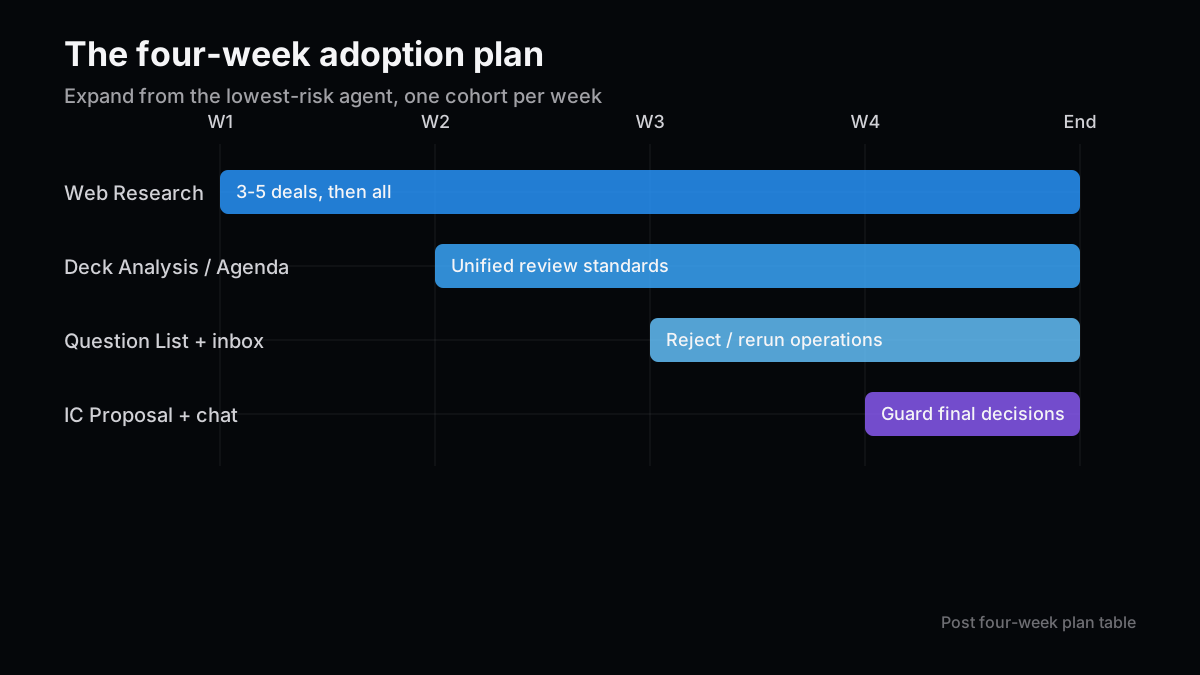
各週でサンプルを2件以上、人が元資料と照合します。承認率だけを見ると、レビューが甘いチームほど良く見えるため、evidence defectの抜き取り監査をセットにします。
また、自動化に向かない案件を先に決めます。ステルス企業、訴訟・規制リスクが高い案件、特殊個人情報を含む資料、契約上外部APIへ送れない資料は対象外です。除外は失敗ではなく、運用設計の一部です。
最後に、導入効果を簡単に消してしまうパターンを挙げます。
- 承認ボタンの形骸化: 全件を読まずに承認すると、Human-in-the-loopは監査ログの演出になります。
- 出力の過剰保存: 似た生成文書が増えると、どれが最新版か分からなくなります。系譜と版管理が必要です。
- KPIの単独最適化: 時間だけ短くすると品質が落ち、承認率だけ上げると難しい案件を避けます。
- 機密確認の慣れ: 同じモーダルを繰り返すと無意識に押されます。送信項目を具体表示し、高リスク操作を別デザインにします。
- プロンプトだけで改善: 入力データ不足、古い資料、業務状態の誤りは、プロンプトを書き換えても直りません。
- AI成果物の自己増殖: AI生成文書を次のAIが一次資料と誤認すると、誤りが強化されます。
私は、導入初期に多少遅くてもレビュー理由を残す方を選びます。そのログがなければ、3か月後にモデル、プロンプト、入力、業務ルールのどこを直すべきか判断できないからです。
ValuScopeの使い方は、ボタンを順に押す話ではありません。公開情報、内部資料、人の判断を分離し、各エージェントの成果物を次の検証へ渡す運用です。
実装からは、標準化、状態可視化、成果物系譜、承認境界、競合防止という効果を確認できます。一方、工数削減率、投資成果、品質向上率はまだ測定が必要です。この線引きを崩さないことが、AIプロダクトへの信頼につながります。
私が目指したいのは、AIが「投資する会社」を決める状態ではありません。AIが不足情報と反証条件を早く並べ、人が以前より説明可能な判断をする状態です。自動化率が低く見えても、判断の再現性が上がるなら十分に大きな効果です。
次号の記事案
- 案1:AIエージェントKPIダッシュボードを実装する — RunとActionItemから承認率、再実行率、滞留時間、token費用、evidence defectを算出します。
- 案2:AI出力のサンプル監査を設計する — 元資料照合の抽出方法、重大度分類、レビュー担当のキャリブレーションを実装可能な運用へ落とします。
- 案3:自動承認を段階導入する条件 — 低リスク処理だけを対象に、信頼度ではなく過去の欠陥率と可逆性で自動化範囲を決めます。
本記事は情報提供を目的としており、特定の銘柄・サービス・投資行動を推奨するものではありません。執筆には生成AIを利用し、ソースコードと公式資料をもとに内容を確認しています。詳細は免責事項をご覧ください。
Operating Agentic Apps: A ValuScope Workflow and Measurement Guide
Version note: This article reflects the
valuscope-next
screens, manual, and code as of July 12, 2026. No public production statistics establish a ValuScope labor-reduction rate or investment-performance effect. I therefore separate effects visible in the implementation from KPIs that still need measurement.
Part one covered design philosophy, and part two covered implementation. The final part is about operation. When I helped standardize diligence quality in an investment team, I learned that a capable tool is not enough. An operating model must say who reviews what, in which order, against which acceptance standard.
The usage and measurement conclusions are below.
| Perspective | Practical point |
|---|
| Starting point | Prepare the Deal and Fund Profile, then begin with public Web Research |
| Documents | Store only authorized material and pass it to Deck Analysis and later agents |
| Human decision | Review the artifact, proposed stage, and next agent in the inbox |
| Improvement | Record rejection reasons and use them to change input or prompts on rerun |
| Observable effects | Standardized work, visible state, artifact lineage, explicit decision points |
| Effects to measure | Labor, approval rate, reruns, quality, stage dwell time, and cost effectiveness |
Measure whether decision-relevant evidence arrives faster, more completely, and with a clearer audit trail—not how many words the model generated.
Launching an agent without context tends to produce generic analysis. ValuScope grounds work in three sources: Deal, Fund Profile, and Document.
| Foundation | Minimum information | Effect on output |
|---|
| Deal | Company, website, industry, stage, description | Web research and entity accuracy |
| Fund Profile | Fund size, sectors, stage, geography, ticket | Fund fit and issue prioritization |
| Document | Deck, financials, meeting notes, references | Company-specific hypotheses, numbers, gaps |
Fund Profile is easy to overlook. The same startup should be evaluated differently by a small seed fund and a large late-stage vehicle. The June 4 change that added fund data to agent context moved ValuScope from general company analysis toward analysis for this investor.
More documents are not automatically better. An old deck, new financial model, and undated meeting note may contain conflicting numbers. Keep filenames, document types, dates, and sharing rights clean enough that a reviewer can identify primary evidence.
Web Research is the natural first agent. It uses public-safe information such as company name, website, industry, and stage to inspect official claims, news, and third-party evidence.
Before execution, verify four things:
- The company is not operating in stealth.
- The name and description may be sent to web search and the OpenAI API.
- The input excludes nonpublic revenue, valuation, and personal information.
- The company website identifies the correct entity.
ValuScope displays a dedicated confirmation for web-search runs. The extra click matters because it reframes the action from “run AI” to “send these fields to external services.”
When reviewing output, look past fluency and check:
- Are source URLs and dates present?
- Are company claims separated from third-party verification?
- Do market figures share a definition, geography, and date?
- Is missing information explicitly marked unknown?
- Does the output identify claims that must be verified from documents?
The useful acceptance criterion is not simply pass or fail. It is whether the research produced the right next verification tasks. Completing an investment view from public research alone would systematically favor companies with stronger public communication.
After Web Research, use Deck Analysis when a pitch deck exists. If no source document is available, the workflow can move to Meeting Agenda instead, avoiding a complete stop while documents are pending.
Review Deck Analysis against explicit criteria.
| Dimension | Strong output | Warning sign |
|---|
| Numbers | Unit, period, currency, and source page align | Revenue and ARR or monthly and annual figures mix |
| Fact vs estimate | Estimates include assumptions and confidence | Market share absent from the deck is stated as fact |
| Investment thesis | Conditions and kill criteria appear together | Only strengths are listed |
| Moat | Durability is explained through a framework such as 7 Powers | Analysis stops at “unique technology” |
| Missing information | Owner, timing, and evidence request are specific | “Further review needed” ends the section |
When I investigated a yield issue that had been attributed to equipment, I avoided locking onto one story and asked what observation would falsify each hypothesis. Agent review needs the same discipline. The goal is not a plausible narrative but a falsifiable set of questions.
ValuScope can save Deck Analysis as a DOCX Document, allowing later agents to reuse the artifact. That introduces a feedback risk: an AI-generated document can be mistaken for primary evidence. The implementation excludes generated files with the
AI-
prefix when deciding whether source documents exist. It is a small but important guard.
When a run finishes, an
AWAITING_REVIEW
card appears in the action inbox. The card shows the deal, agent, model, summary, proposed stage, and next agents.
Reviewing in three layers makes the process repeatable.
| Layer | What to inspect | Example decision |
|---|
| Evidence | Sources, numbers, dates, document consistency | Reject on a factual error |
| Analysis | Thesis, falsifiers, risks, missing data | Rerun with a specific missing angle |
| Action | Proposed stage and next agent | Do not approve if the deal should not advance |
“Well written” and “ready to advance” are separate judgments. The card presents them together, but the operating procedure should keep them distinct.
Approval moves the workflow forward only and launches the next step. Web Research proposes
SCREENING
; Deck Analysis or Meeting Agenda proposes
DD
; Question List proposes
IC
. IC Proposal does not automatically move a deal to
CLOSED
. The investment or pass decision remains manual.
When rejecting, record a reason that can change the next run. “Low quality” is not actionable. “Two of three comparable companies are private,” “ARR and revenue were conflated,” or “a 2024 deck was treated as current” gives the team a concrete correction.
The agents become easier to evaluate when their artifacts form one chain instead of six isolated tools.
Define the meeting objective as distinguishing advance from pass, not collecting as much information as possible. Every priority question should state how its answer changes the thesis. A killer question protects scarce meeting time.
A 20–30 question diligence list should include the question, intent, expected evidence, and decision threshold. A document alone does not create progress. Adding owner, due date, answer, evidence link, and unresolved status turns the list into diligence operations.
Review TAM/SAM/SOM, base/bull/bear cases, MOIC, pre-mortem, and missing evidence. Polished prose can hide unverified assumptions. Start with what must be true for the recommendation to hold.
The chain is not intended to replace judgment. It organizes the entrance to each meeting and leaves explicit verification tasks at the exit.
ValuScope chat can answer from portfolio and deal context or construct a data-change proposal. “List companies with short runway” is a query. “Move Company A to DD” is a change request.
For changes, the interface compares current and new values and lets the user select fields. If the database changed after proposal generation, conflicting fields are skipped. In a team environment, that conflict is not a failure. It protects a newer human edit from an older AI proposal.
A useful operating rule is:
- Use chat broadly for search, aggregation, summarization, and comparison.
- Receive database mutations as proposals and inspect the diff.
- Confirm count and targets before any multi-record change.
- Link financial or stage changes to the supporting document or meeting history.
Chat can be the entry point, while forms, types, history, and approval remain the data-quality boundary.
Even without public production statistics, the code and specification demonstrate several functional effects. These are features that exist, not speculative productivity claims.
| Effect | Implementation evidence | Meaning |
|---|
| Work standardization | Six shared personas, skills, and output formats | Reduce variation in review dimensions |
| State visibility | Run, ActionItem, and inbox grouping | Separate running, review, failed, and completed work |
| Explicit judgment | Approval, rejection, rerun, and decision note | Separate generated output from human decision |
| Artifact reuse | Document, DOCX/XLSX, and sourceDocIds | Reuse work in later agents and meetings |
| Forward-only safety | isForwardStage | Prevent accidental backward transitions during chaining |
| Concurrent-edit safety | currentValue conflict detection | Avoid overwriting newer data with stale proposals |
The most important effect may not be labor reduction. It may be visibility into where work is waiting. Diligence often stalls on missing documents, unclear ownership, or pending review rather than analysis itself. The inbox is valuable as a decision queue, not merely an AI output folder.
Do not announce “50% faster” before measurement. Capture four weeks of baseline, then compare a four-to-eight-week adoption period. Deal difficulty varies, so stratify by stage, industry, and document completeness where possible.
| KPI | Definition | Desired direction | Caveat |
|---|
| Time to first review | Run start to AWAITING_REVIEW | Lower | Separate model speed from document volume |
| Human review time | Review start to approve/reject | Lower | Superficial review can look fast |
| First-pass approval rate | Approved without rerun | Higher | Stratify hard cases |
| Rerun rate | Same agent type rerun | Lower | Intentional iteration is not necessarily bad |
| Rejection reason coverage | Rejections with a concrete reason | Higher | Audit meaningless free text |
| Stage dwell time | Days spent in each stage | Lower | A well-reasoned pass is not delay |
| Evidence defect rate | Missing source, wrong number, wrong date | Lower | Requires sample audits |
| Proposal conflict rate | Updates skipped because DB changed | Contextual | A high rate may indicate stale proposals |
| Cost per approved artifact | API and worker cost per approval | Lower | Low cost is useless with low quality |
| Downstream reuse rate | Artifact referenced in a later step or meeting | Higher | Do not count download alone as use |
You do not need a large analytics platform to begin. Existing Run and ActionItem timestamps support derived metrics like these.
type AgentMetric = {
  runId: string
  agentType: string
  queuedAt: string
  completedAt: string | null
  decidedAt: string | null
  decision: 'APPROVED' | 'REJECTED' | 'DISMISSED' | null
  rerunOf: string | null
  tokensUsed: number
  evidenceDefects: number
}

const minutesBetween = (from: string, to: string | null) =>
  to ? (Date.parse(to) - Date.parse(from)) / 60_000 : null

const summarize = (m: AgentMetric) => ({
  generationMinutes: minutesBetween(m.queuedAt, m.completedAt),
  decisionMinutes: m.completedAt ? minutesBetween(m.completedAt, m.decidedAt) : null,
  firstPassApproved: m.decision === 'APPROVED' && m.rerunOf === null,
  costProxy: m.tokensUsed,
  evidenceDefects: m.evidenceDefects,
})
Keep definitions identical across teams and languages. If “completed,” “approved,” and “used” mean different things to different groups, a polished dashboard will not produce comparable evidence.
Roll out the lowest-risk agents first instead of asking everyone to use all six immediately.
| Week | Scope | Exit criterion |
|---|
| 1 | Web Research on three to five deals | Data confirmation and source review become routine |
| 2 | Deck Analysis and Meeting Agenda | Review standards for numbers and gaps are aligned |
| 3 | Question List and inbox approval | Reasons, reruns, owners, and due dates are operational |
| 4 | IC Proposal and chat change proposals | The team confirms the boundary around final decisions |
Each week, manually compare at least two samples with source documents. Approval rate alone rewards a team for weak review, so pair it with sampled evidence-defect audits.
Define excluded cases upfront. Stealth companies, high litigation or regulatory sensitivity, special-category personal data, and documents that contractually cannot reach an external API should remain outside the workflow. Exclusion is not failure; it is part of the operating design.
Several operating habits can erase the value of the architecture.
- Rubber-stamp approval: if reviewers do not read outputs, human-in-the-loop becomes decorative audit logging.
- Artifact overproduction: similar generated documents make the current version unclear. Preserve lineage and versioning.
- Single-metric optimization: minimizing time can lower quality, while maximizing approval can avoid hard cases.
- Confirmation fatigue: repetitive warnings become invisible. Show concrete fields and distinguish higher-risk actions visually.
- Prompt-only improvement: missing input, stale documents, and incorrect workflow state cannot be fixed by prompt wording.
- Self-reinforcing artifacts: if generated documents are treated as primary evidence, errors gain apparent authority.
During early adoption, I would accept slower reviews in exchange for specific decision notes. Without that evidence, the team cannot later determine whether to change the model, prompt, input, or workflow rule.
Operating ValuScope is not a sequence of agent buttons. It is a process that separates public information, internal documents, and human judgment, then passes each artifact to the next verification step.
The implementation demonstrates standardization, state visibility, artifact lineage, approval boundaries, and conflict prevention. Labor reduction, investment outcomes, and quality improvement still require measurement. Preserving that distinction is part of earning trust in an AI product.
The target state is not an AI that selects investments. It is an AI that surfaces missing evidence and falsifying conditions sooner, enabling people to make more explainable decisions. Even with a modest automation rate, higher decision reproducibility would be a meaningful effect.
Next Issue Ideas
- Idea 1: Implement an agent KPI dashboard — Calculate approval, rerun, dwell time, token cost, and evidence-defect metrics from Run and ActionItem data.
- Idea 2: Design a sample audit for AI output — Turn source comparison, severity grading, and reviewer calibration into a repeatable operating process.
- Idea 3: Define a staged path to auto-approval — Select low-risk cases using historical defect rate and reversibility rather than model confidence alone.
This article is for informational purposes only and does not recommend any security, product, investment, or securities action. Generative AI assisted the writing, and the content was checked against source code and official documentation. See the disclaimer for details.