AIエージェント組み込みアプリの設計方法:Next.js・Amplify・Lambdaで作る実装パターン
バージョン注記: 2026年7月12日時点の
valuscope-next
(Next.js 16.2、React 19、AWS Amplify Gen 2、TanStack Query v5、OpenAI Responses API)の実装を参照しています。APIやモデルIDは変更され得るため、導入時は各公式資料と利用可能モデルを再確認してください。
第1回では、AIを提案者にとどめ、実行状態と人の判断状態を分離する思想を整理しました。今回はコードの層へ降ります。私はAWSバックエンドを独学で組んだ経験から、AI処理そのものより、タイムアウト・再実行・状態同期の方が設計工数を食うと感じています。
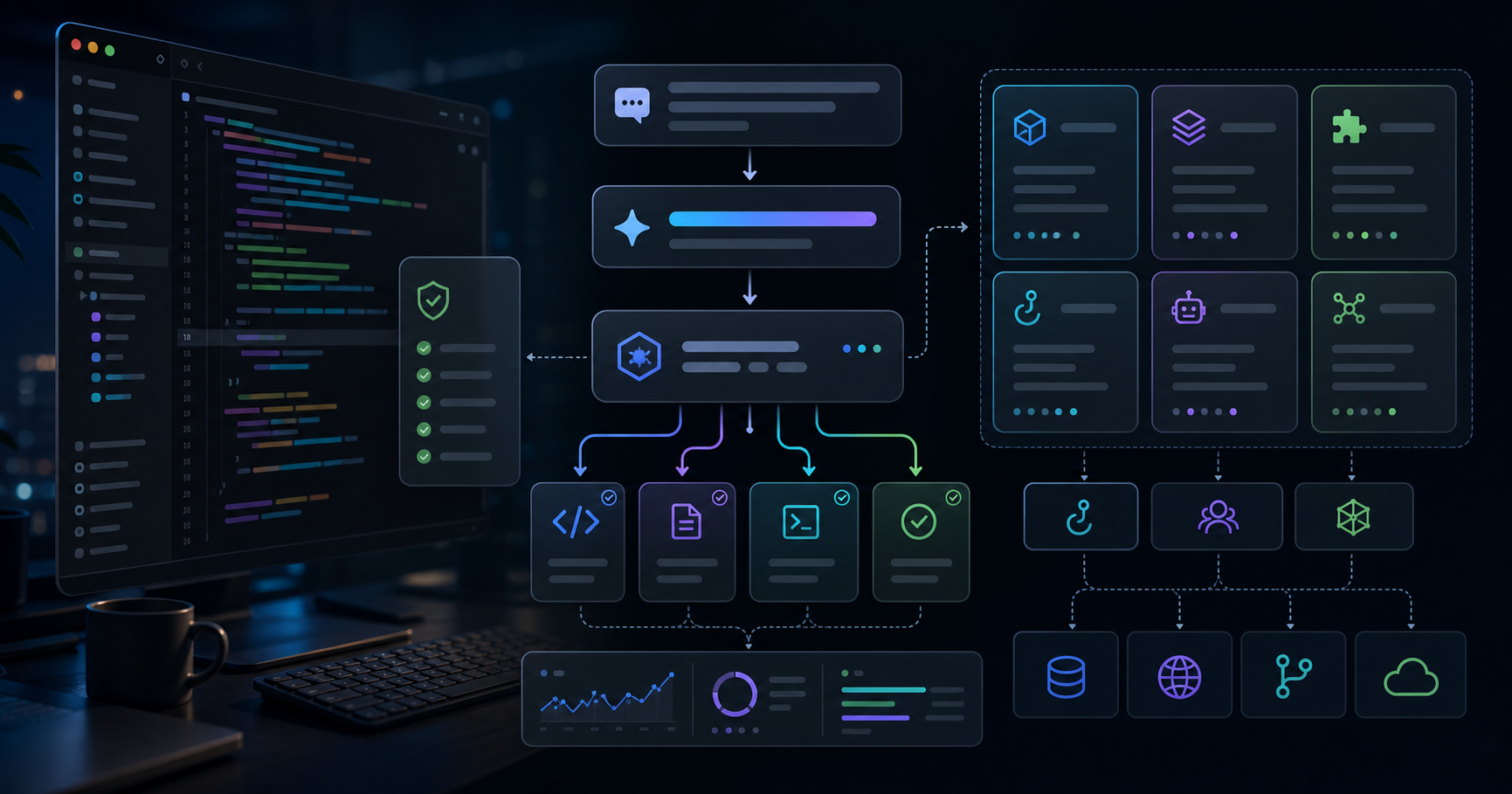
先に、ValuScopeの実装パターンを一枚にまとめます。
| レイヤー | 採用技術 | 責務 |
|---|
| UI | Next.js App Router + React | 実行設定、機密確認、受信箱、承認・却下 |
| API/BFF | Next.js Route Handler | JWT検証、Membership、契約、入力検証、ジョブ作成 |
| Data | Amplify Data / AppSync | Run、ActionItem、Deal、History、Documentの永続化 |
| Worker | Amplify Function / Lambda | 資料取得、Responses API実行、成果物保存、状態更新 |
| Storage | Amplify Storage / S3 | 元資料とDOCX/XLSX等の成果物 |
| Client sync | TanStack Query | 実行中だけ短周期ポーリングし、完了後に停止 |
重要なのは、API RouteがAI完了まで待たないことです。長い処理をユーザーのHTTP接続から切り離し、先に追跡可能なRunを作ります。
AIエージェントを普通のCRUD APIとして実装すると、
POST → モデル応答待ち → DB保存 → Response
になります。資料解析やWeb検索が数分かかれば、ブラウザ、CDN、Route Handler、上流サービスのどこかでタイムアウトします。
ValuScopeは2026年4月29日の開発履歴で、レポート生成の504タイムアウトを非同期化によって解消しました。その後、同じ考え方が類似企業調査とディールAIへ広がっています。失敗を一度経験した結果、非同期ジョブが共通パターンになった点は実装史として興味深いところです。
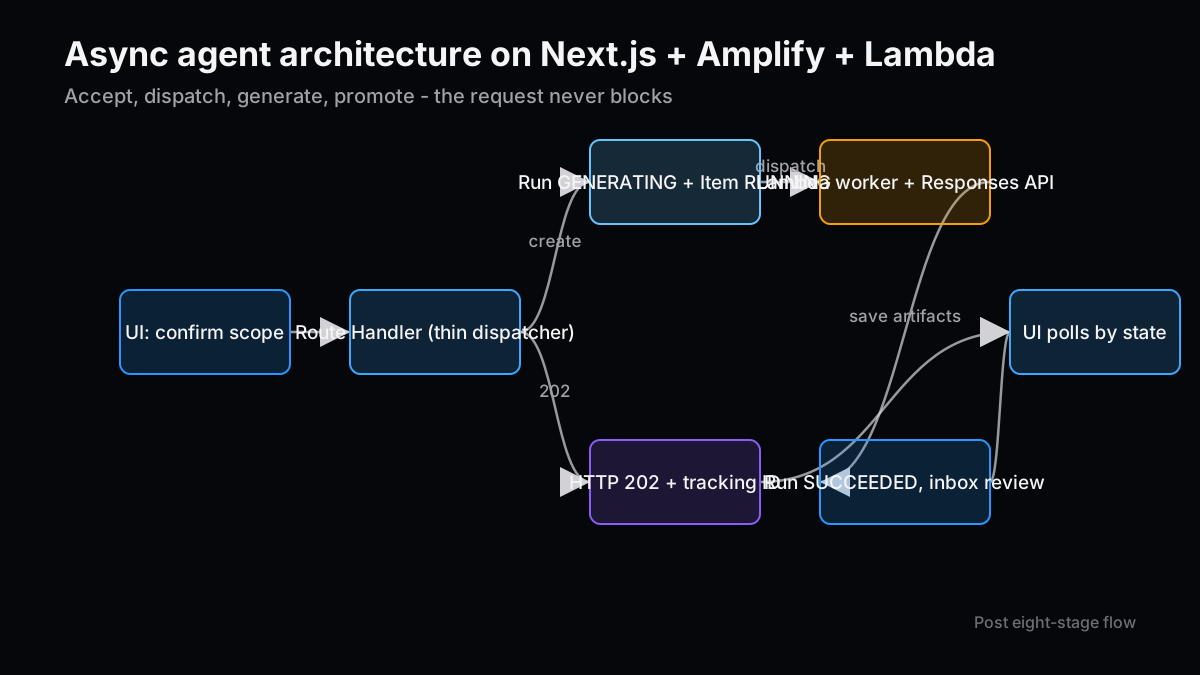
処理の流れは次の8段階です。
- UIが外部送信範囲を表示し、利用者が実行を確認する。
- Route HandlerがCognito JWTと入力を検証する。
- 組織MembershipとAIアドオン契約を確認する。
DealAgentRun(status=GENERATING)
を作る。ActionItem(status=RUNNING)
を作る。- Lambda workerへ処理を委譲し、APIはHTTP 202を返す。
- workerが資料・ファンド文脈を取得し、OpenAI Responses APIを呼ぶ。
- 結果と成果物を保存し、Runを
SUCCEEDED
、ActionItemを AWAITING_REVIEW
へ更新する。
この分割で、ユーザーは画面を離れても処理を継続できます。HTTP 202は成功した成果物ではなく、依頼を受け付け、追跡IDを発行したことを意味します。
Next.jsのRoute Handlerは、UIとバックエンドの境界として便利です。ただし重いAI処理まで置くと、BFFがワーカーになってしまいます。ValuScopeの
/api/deals/agents/run
は、認証・認可・契約・入力・追跡レコード作成に責務を絞っています。
実装を一般化すると、次の形になります。
export async function POST(req: NextRequest) {
  const session = await getSessionFromRequest(req)
  const input = await parseJson(req, runAgentSchema)
  if (!input.ok) return input.response

  await assertOrganizationMembership(session.userId, input.data.organizationId)
  await assertAiAddonEnabled(input.data.organizationId)

  const run = await createAgentRun({
    organizationId: input.data.organizationId,
    dealId: input.data.dealId,
    agentType: input.data.agentType,
    status: 'GENERATING',
    requestedByUserId: session.userId,
  })

  await createActionItem({
    organizationId: input.data.organizationId,
    agentRunId: run.id,
    status: 'RUNNING',
    type: 'REVIEW_AGENT_OUTPUT',
  })

  await dispatchWorker({ runId: run.id, ...input.data })

  return NextResponse.json({ runId: run.id, status: 'GENERATING' }, { status: 202 })
}
順序にも意味があります。workerを先に起動し、後からRunを作ると、非常に速く失敗したジョブやディスパッチ失敗を追跡できません。先に記録し、そのIDをすべてのログ、成果物、アクションへ渡す方が調査しやすくなります。
一方で、現行ValuScopeのworker委譲はFunction URLへのPOSTを5秒で打ち切るfire-and-forgetです。接続がAbortされてもworkerが受理したとみなすため、厳密な配送保証ではありません。本番規模を上げるなら、SQS、EventBridge、Lambdaの非同期Invokeなど、受領と再試行を管理できる経路が候補です。
プロンプトより先に決めたいのが、実行を説明できるデータモデルです。ValuScopeのRunは、単なる結果テキストではなく、モデル、品質設定、出力形式、入力資料ID、生成資料ID、token使用量、エラー、完了時刻を持ちます。
| フィールド群 | 例 | 何に使うか |
|---|
| Identity | organizationId , dealId , requestedByUserId | テナント・対象・依頼者の追跡 |
| Execution | agentType , status , model , effort , speed | 再現性と性能比較 |
| Provenance | sourceDocIds , producedDocumentId | 入出力の系譜 |
| Result | resultMarkdown , structuredJson , fileKey | UI表示と成果物配布 |
| Observability | tokensUsed , errorMessage , completedAt | コスト・障害・所要時間 |
ActionItemは、人が何を判断するかへ絞ります。
proposedStatus
、
nextAgentTypes
、
decisionNote
、
parentActionItemId
、
sourceKey
が重要です。AI本文を二重保存せずRunへ参照させることで、判断カードと成果物の責務も分けられています。
私は量産プロセス開発で、結果だけでなくロット、装置、条件、測定時刻の系譜がないデータに苦しみました。AI出力も同じです。「この文章が出た」だけでは改善できません。どの入力を、どの設定で処理したかが必要です。
UI、Route Handler、Lambdaでエージェント名やモデルを別々にハードコードすると、必ずずれます。ValuScopeは
src/lib/deals/agents.ts
に6種類の定義を集約し、クライアントとworkerの両方から参照します。
設定が持つのは、モデルだけではありません。
type AgentConfig = {
  scope: 'pipeline' | 'deal'
  output: 'markdown' | 'structured'
  needsDocs: boolean
  usesWebSearch: boolean
  producesDocument: boolean
}

const AGENTS: Record<string, AgentConfig> = {
  WEB_RESEARCH: {
    scope: 'deal',
    output: 'markdown',
    needsDocs: false,
    usesWebSearch: true,
    producesDocument: true,
  },
  QUESTION_LIST: {
    scope: 'deal',
    output: 'structured',
    needsDocs: true,
    usesWebSearch: false,
    producesDocument: true,
  },
}
needsDocs
と
usesWebSearch
を同じ定義で扱うことで、機密境界が実装条件になります。これはプロンプトだけに注意書きを置くより強い設計です。また、Lambdaへ共有するモジュールはReactやNode固有APIをimportしない純粋なデータ・型に限定しています。実行環境をまたぐ共有コードは、依存を持たないこと自体が品質条件です。
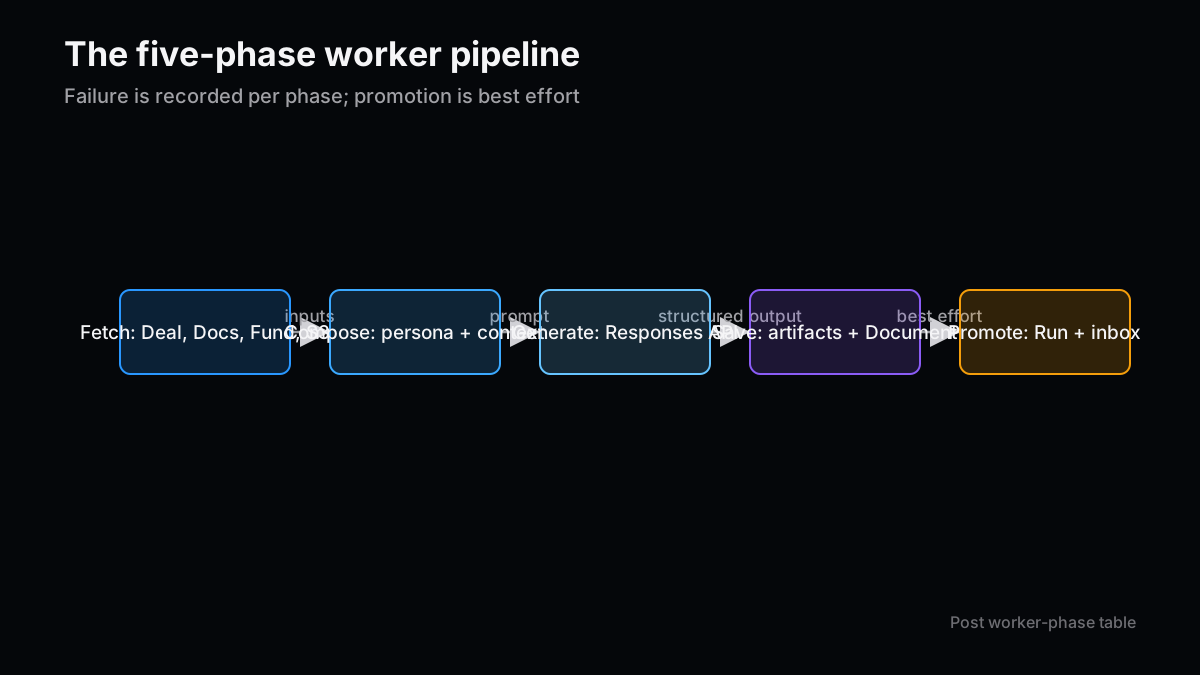
workerは長くなりやすいので、処理を五つの段階へ分けます。
| 段階 | 主な処理 | 失敗時の記録 |
|---|
| 取得 | Deal、Document、FundProfile、S3オブジェクト | RunとActionItemをFAILED |
| 組み立て | persona、共通Skill、案件文脈、追加入力 | 入力種別と対象IDをログ |
| 生成 | Responses API、web search、Structured Outputs | HTTP statusと短縮エラー |
| 保存 | Markdown、structured JSON、DOCX/XLSX、Document | 部分成功を区別 |
| 昇格 | RunをSUCCEEDED、受信箱をAWAITING_REVIEW | best-effort失敗を警告 |
PDFはOpenAI Files APIへ送り、Office文書はローカルでテキスト抽出して入力するなど、形式によって経路を分けています。現行の資料分析Routeでは最大25MB、抽出テキスト最大400,000文字、5分タイムアウトというガードも確認できます。
ここで注意したいのは、「Run成功」と「ActionItem昇格」が完全なトランザクションではないことです。現行workerは受信箱更新をbest-effortとし、失敗してもRun自体は成功のままにします。この判断は成果物を失わない利点がありますが、成功Runが受信箱へ出ない不整合を監視する必要があります。
すべてをJSONにすると文章の質が落ち、すべてをMarkdownにすると後続処理が不安定になります。ValuScopeは成果物の用途で分けています。
- Web調査、資料分析、面談アジェンダ、IC付議骨子はMarkdown中心。
- Pipeline ToDoとDD質問リストは構造化出力。
- チャットの変更提案は厳格なJSON Schema。
Structured Outputsでは
strict: true
とJSON Schemaを使い、項目名、型、必須フィールドを固定します。ただし、スキーマに一致することは内容が正しいことを意味しません。実在企業、金額、日付、現在値などのドメイン検証はサーバー側に残します。
特に更新提案では、次の三層が必要です。
- モデル出力をJSON Schemaで制約する。
- Zodで受信JSONを再検証する。
- DBから最新値を再取得し、ホワイトリスト・型・競合を再検証する。
この三層を通って初めて、AIの文章が業務データの変更候補になります。
非同期化すると、次はUIが完了をどう知るかという問題が出ます。ValuScopeの
useDealAgents
は、
GENERATING
があれば4秒、
PENDING
なら10秒で再取得し、アクティブなRunがなければ停止します。受信箱も要確認があると10秒周期で更新します。
TanStack Queryの
refetchInterval
は、状態に応じて数値または
false
を返せます。一般化すると次の形です。
useQuery({
  queryKey: ['agent-runs', dealId],
  queryFn: () => listAgentRuns(dealId),
  refetchInterval: (query) => {
    const runs = query.state.data ?? []
    if (runs.some((run) => run.status === 'GENERATING')) return 4_000
    if (runs.some((run) => run.status === 'PENDING')) return 10_000
    return false
  },
})
実装は簡単ですが、複数コンポーネントが同じquery keyを監視する場合、observerごとにタイマーが動く点には注意が必要です。規模が大きくなれば、AppSync subscription、SSE、Webhookからのpushなども比較対象になります。
受信箱で承認すると、ValuScopeはActionItemを
APPROVED
にし、Dealを前方ステージへ更新し、DealHistoryを記録し、次のエージェントを起動します。これは複数の副作用を持つコマンドです。
望ましい順序は次の通りです。
- ActionItemを最新取得し、まだ
AWAITING_REVIEW
か確認する。 - 承認者、時刻、noteを記録する。
- 現在ステージを再取得し、前方遷移だけ許可する。
- DealHistoryへbefore/afterを書く。
sourceKey
で次ジョブの重複を抑止する。- 次工程を配送し、配送結果を追跡する。
現行実装はReact hookでこれを行い、次工程は
Promise.allSettled
のbest-effortです。小規模では機能しますが、私は今後サーバー側の単一コマンドへ移す価値があると見ています。承認記録、ステージ更新、次ジョブのoutboxを書き込み、別workerがoutboxを配送すれば、途中失敗から復旧しやすくなります。
コードを写すだけでは危険なので、現行実装と公式仕様から見える注意点をまとめます。
- Function URL POSTは durable queueではない: Abort後に受理されたかをクライアントだけでは断定できません。
- Lambdaの再試行は重複を生む: AWSは非同期呼び出しが同じイベントを複数回処理し得ると明記しています。Run ID単位の冪等性が必要です。
- DLQと失敗destination: 再試行し尽くしたイベントを捨てない構成が必要です。
- 認可の二重化: Route HandlerのMembership確認と、AppSyncモデルのauthorizationを両方テストします。
- APIデータ保持: Responses API、Files API、background modeでは保持条件が異なります。契約要件に合わせて確認します。
- 成果物の部分成功: モデル出力成功、S3保存失敗、Document作成失敗を一つのFAILEDへ潰さず、復旧単位を残します。
- モデルIDの集中管理: UI、route、workerで同じ共有定義を参照し、入力値をallowlistで検証します。
私が特に違和感を持つのは、デモでは「返答が出た」だけで完成に見えることです。業務アプリでは、返答の前後にある認証、配送、保存、承認、再実行の方が長く使う品質を決めます。
再利用可能な最小構成は、次の通りです。
- Route Handlerは認証・認可・検証・Run作成・配送だけを行う。
- workerが重いAI処理と成果物生成を担う。
- Runと人のActionItemを別々に保存する。
- 自由文と構造化出力を用途で分ける。
- UIはアクティブ状態だけポーリングする。
- 承認時だけ前方遷移と次工程を起動する。
- すべての外部副作用にRun IDと冪等性キーを持たせる。
この構成なら、最初は1種類のエージェントから始め、後で役割を増やせます。逆に、最初から万能チャットへ全データと全権限を渡すと、あとから境界を戻すのは難しくなります。
次編では、ValuScopeを実際にどう使うかを、ディール登録からWeb調査、資料分析、受信箱承認、IC付議まで通して説明し、効果を測るKPIも定義します。
次号の記事案
- 案1:Transactional Outboxで承認連鎖を堅牢化する — 承認、ステージ更新、次ジョブ配送を途中失敗から復旧できるサーバーコマンドへ作り替えます。
- 案2:AppSync Subscriptionでポーリングを置き換える — Run状態のpush配信を実装し、通信量と画面反映遅延を比較します。
- 案3:AI成果物のprovenanceを可視化する — 元資料、プロンプト版、モデル、生成文書、承認判断を一つの系譜画面に結びます。
本記事は情報提供を目的としており、特定の銘柄・サービス・投資行動を推奨するものではありません。執筆には生成AIを利用し、ソースコードと公式資料をもとに内容を確認しています。詳細は免責事項をご覧ください。
How to Architect an Agentic App with Next.js, Amplify, and Lambda
Version note: This article reflects the July 12, 2026 implementation of
valuscope-next
, using Next.js 16.2, React 19, AWS Amplify Gen 2, TanStack Query v5, and the OpenAI Responses API. APIs and model identifiers change, so verify current official documentation and available models before adopting the examples.
Part one established the philosophy: keep the agent in a proposer role and separate execution state from human decision state. This article moves down into code. Building AWS backends taught me that timeouts, retries, and state synchronization often consume more design effort than the model call itself.
Here is the ValuScope implementation pattern in one table.
| Layer | Technology | Responsibility |
|---|
| UI | Next.js App Router + React | Run settings, data-use confirmation, inbox, approval and rejection |
| API/BFF | Next.js Route Handler | JWT, membership, subscription, input validation, job creation |
| Data | Amplify Data / AppSync | Persist Run, ActionItem, Deal, History, and Document records |
| Worker | Amplify Function / Lambda | Fetch documents, call Responses API, save artifacts, update state |
| Storage | Amplify Storage / S3 | Source files and generated DOCX/XLSX artifacts |
| Client sync | TanStack Query | Poll quickly only while a run is active, then stop |
The central choice is that the API route does not wait for AI completion. Long work is detached from the user's HTTP connection, and a trackable Run is created first.
Implementing an agent like a normal CRUD endpoint produces
POST → wait for model → save → respond
. Document analysis or web search can take minutes, so the browser, CDN, Route Handler, or an upstream service will eventually time out.
ValuScope's April 29 development history records a 504 report-generation issue fixed through asynchronous processing. The pattern later expanded to comparable research and deal agents. I find this evolution useful: an actual timeout turned asynchronous jobs into a shared architecture rather than a theoretical preference.
The request moves through eight stages.
- The UI displays the external data boundary and asks the user to confirm.
- The Route Handler validates the Cognito JWT and request body.
- It checks organization membership and the AI add-on entitlement.
- It creates
DealAgentRun(status=GENERATING)
. - It creates
ActionItem(status=RUNNING)
. - It dispatches a Lambda worker and returns HTTP 202.
- The worker loads documents and fund context and calls the Responses API.
- It stores results, moves the Run to
SUCCEEDED
, and moves the ActionItem to AWAITING_REVIEW
.
Users can leave the page without cancelling the operation. HTTP 202 does not promise a successful artifact; it means the request was accepted and a tracking identifier was issued.
Next.js Route Handlers are a convenient boundary between the UI and backend. They become fragile when they also act as long-running workers. ValuScope's
/api/deals/agents/run
limits itself to authentication, authorization, entitlement, validation, tracking-record creation, and dispatch.
Generalized, the implementation looks like this.
export async function POST(req: NextRequest) {
  const session = await getSessionFromRequest(req)
  const input = await parseJson(req, runAgentSchema)
  if (!input.ok) return input.response

  await assertOrganizationMembership(session.userId, input.data.organizationId)
  await assertAiAddonEnabled(input.data.organizationId)

  const run = await createAgentRun({
    organizationId: input.data.organizationId,
    dealId: input.data.dealId,
    agentType: input.data.agentType,
    status: 'GENERATING',
    requestedByUserId: session.userId,
  })

  await createActionItem({
    organizationId: input.data.organizationId,
    agentRunId: run.id,
    status: 'RUNNING',
    type: 'REVIEW_AGENT_OUTPUT',
  })

  await dispatchWorker({ runId: run.id, ...input.data })

  return NextResponse.json({ runId: run.id, status: 'GENERATING' }, { status: 202 })
}
Ordering matters. If a worker starts before its Run exists, an immediate failure or dispatch problem can disappear without a tracking record. Creating the record first gives logs, artifacts, and action items a common correlation ID.
The current ValuScope dispatcher sends a Function URL request and aborts its wait after five seconds. It treats a timeout as likely accepted, which is not a durable delivery guarantee. At higher scale, SQS, EventBridge, or asynchronous Lambda invocation would provide stronger receipt and retry semantics.
Before refining prompts, define the data needed to explain an execution. A ValuScope Run stores more than generated text: model and quality settings, output format, input document IDs, generated document ID, token usage, errors, and completion time.
| Field group | Examples | Purpose |
|---|
| Identity | organizationId , dealId , requestedByUserId | Track tenant, subject, and requester |
| Execution | agentType , status , model , effort , speed | Reproduction and performance comparison |
| Provenance | sourceDocIds , producedDocumentId | Connect inputs to outputs |
| Result | resultMarkdown , structuredJson , fileKey | UI rendering and artifact delivery |
| Observability | tokensUsed , errorMessage , completedAt | Cost, failure, and duration analysis |
The ActionItem focuses on the human decision. Important fields include
proposedStatus
,
nextAgentTypes
,
decisionNote
,
parentActionItemId
, and
sourceKey
. It references the Run instead of duplicating the entire model output.
In manufacturing process work, data without lot, equipment, conditions, and measurement time was almost impossible to improve. Agent output has the same property. “The model wrote this” is insufficient. You need the exact inputs and execution settings that produced it.
Hard-coding agent names and model options independently in the UI, route, and Lambda guarantees drift. ValuScope centralizes all six definitions in
src/lib/deals/agents.ts
, imported by both application and worker code.
The configuration describes more than a default model.
type AgentConfig = {
  scope: 'pipeline' | 'deal'
  output: 'markdown' | 'structured'
  needsDocs: boolean
  usesWebSearch: boolean
  producesDocument: boolean
}

const AGENTS: Record<string, AgentConfig> = {
  WEB_RESEARCH: {
    scope: 'deal',
    output: 'markdown',
    needsDocs: false,
    usesWebSearch: true,
    producesDocument: true,
  },
  QUESTION_LIST: {
    scope: 'deal',
    output: 'structured',
    needsDocs: true,
    usesWebSearch: false,
    producesDocument: true,
  },
}
Representing
needsDocs
and
usesWebSearch
in the same definition turns the confidentiality boundary into executable configuration. That is stronger than a warning that exists only inside a prompt. Shared modules imported by Lambda are also kept free of React and runtime-specific dependencies. For cross-runtime code, dependency absence is itself a quality rule.
Workers become long files quickly. A useful decomposition has five phases.
| Phase | Main work | Failure record |
|---|
| Fetch | Deal, Document, FundProfile, S3 objects | Mark Run and ActionItem failed |
| Compose | Persona, shared skill, deal context, extra input | Log input types and entity IDs |
| Generate | Responses API, web search, Structured Outputs | Capture HTTP status and bounded error |
| Save | Markdown, structured JSON, DOCX/XLSX, Document record | Distinguish partial success |
| Promote | Run to SUCCEEDED, inbox to AWAITING_REVIEW | Warn on best-effort failure |
ValuScope uses different ingestion paths by format. PDFs go through the Files API, while Office files are parsed locally into text. The current document-analysis route also enforces a 25 MB file cap, a 400,000-character extraction cap, and a five-minute timeout.
One subtlety is that Run success and ActionItem promotion are not one transaction. The worker treats inbox promotion as best effort so that an artifact is not discarded when the control-plane update fails. That preserves output but requires monitoring for successful Runs that never appear in the inbox.
Making every response JSON can damage prose quality. Making everything Markdown creates brittle downstream parsing. ValuScope chooses by artifact use.
- Web research, deck analysis, meeting agendas, and IC outlines are primarily Markdown.
- Pipeline ToDo and diligence questions are structured.
- Chat-based data changes use a strict JSON Schema.
Structured Outputs with
strict: true
constrain fields, types, and required properties. Schema compliance does not prove factual correctness. Real companies, amounts, dates, and current values still require domain validation on the server.
Data updates need three layers:
- Constrain model output with JSON Schema.
- Revalidate received JSON with Zod.
- Reload the database and recheck whitelist, type, and conflicts.
Only after those layers does generated text become a candidate business-data mutation.
Asynchronous processing moves the next question to the UI: how does it learn that a run finished? ValuScope's
useDealAgents
refetches every four seconds while any Run is
GENERATING
, every ten seconds for
PENDING
, and stops when no active Run remains. The inbox similarly refreshes when review work exists.
TanStack Query's
refetchInterval
can return a number or
false
based on current query state.
useQuery({
  queryKey: ['agent-runs', dealId],
  queryFn: () => listAgentRuns(dealId),
  refetchInterval: (query) => {
    const runs = query.state.data ?? []
    if (runs.some((run) => run.status === 'GENERATING')) return 4_000
    if (runs.some((run) => run.status === 'PENDING')) return 10_000
    return false
  },
})
The pattern is simple, but each QueryObserver owns its timer even when observers share a key. At larger scale, AppSync subscriptions, SSE, or webhook-driven push become worth comparing.
Approving an inbox item sets the ActionItem to
APPROVED
, moves the Deal forward, records DealHistory, and launches the next agent. This is a command, not a basic field update.
A robust order is:
- Reload the ActionItem and verify it is still
AWAITING_REVIEW
. - Record approver, timestamp, and note.
- Reload the Deal and allow forward transitions only.
- Write before and after states to DealHistory.
- Deduplicate next jobs with
sourceKey
. - Dispatch the next step and track delivery.
The current implementation performs this from a React hook, with next-step requests handled using best-effort
Promise.allSettled
. That can work at small scale, but I see value in moving it to a single server-side command. An approval transaction could write the decision, stage change, and an outbox record, leaving a separate worker to deliver the next job reliably.
Copying the happy-path code is not enough. The current implementation and official service behavior highlight several risks.
- A Function URL POST is not a durable queue: after aborting the wait, the caller cannot prove acceptance by itself.
- Lambda retries can duplicate work: AWS explicitly documents possible duplicate delivery. Idempotency must be keyed to the Run ID.
- Use a DLQ or failure destination: do not silently discard events after retry exhaustion.
- Test authorization twice: Route Handler membership checks and AppSync model authorization must both enforce the intended boundary.
- Review API retention: Responses, Files, and background features can have different retention conditions.
- Represent partial success: model success, S3 failure, and Document-record failure should remain recoverable as separate steps.
- Centralize model allowlists: UI, route, and worker must validate against the same shared identifiers.
AI demos make “the answer appeared” feel like completion. In operational software, the surrounding authentication, delivery, persistence, approval, and recovery paths determine whether the feature survives real use.
The reusable minimum looks like this:
- Route Handler handles auth, authorization, validation, Run creation, and dispatch.
- A worker owns heavy generation and artifact creation.
- Run state and human ActionItem state are stored separately.
- Free text and structured output are selected by downstream use.
- The UI polls only while work is active.
- Approval gates forward transitions and next-step execution.
- Every external side effect carries a Run ID and idempotency key.
This architecture can start with one agent and grow by adding bounded roles. A universal chat assistant with all data and all permissions is much harder to partition later.
Part three walks through the actual operating flow from deal creation to research, document analysis, inbox approval, and an IC outline. It also defines metrics for measuring effects without inventing productivity claims.
Next Issue Ideas
- Idea 1: Harden approval chaining with a transactional outbox — Move approval, stage update, and next-job delivery into a recoverable server-side command.
- Idea 2: Replace polling with AppSync subscriptions — Implement push-based Run updates and compare network volume and UI latency.
- Idea 3: Visualize artifact provenance — Connect source documents, prompt version, model, generated artifact, and human decision in one lineage view.
This article is for informational purposes only and does not recommend any security, product, investment, or securities action. Generative AI assisted the writing, and the content was checked against source code and official documentation. See the disclaimer for details.